Watch Dylan book a meeting.
Forty-two seconds, from a website to a held meeting: the whole job, step by step. Example data throughout.

What happens in the film.
The film has no sound and its captions are part of the picture, so here is each chapter in words.
- Chapter 1, Brief · 0:02 to 0:07
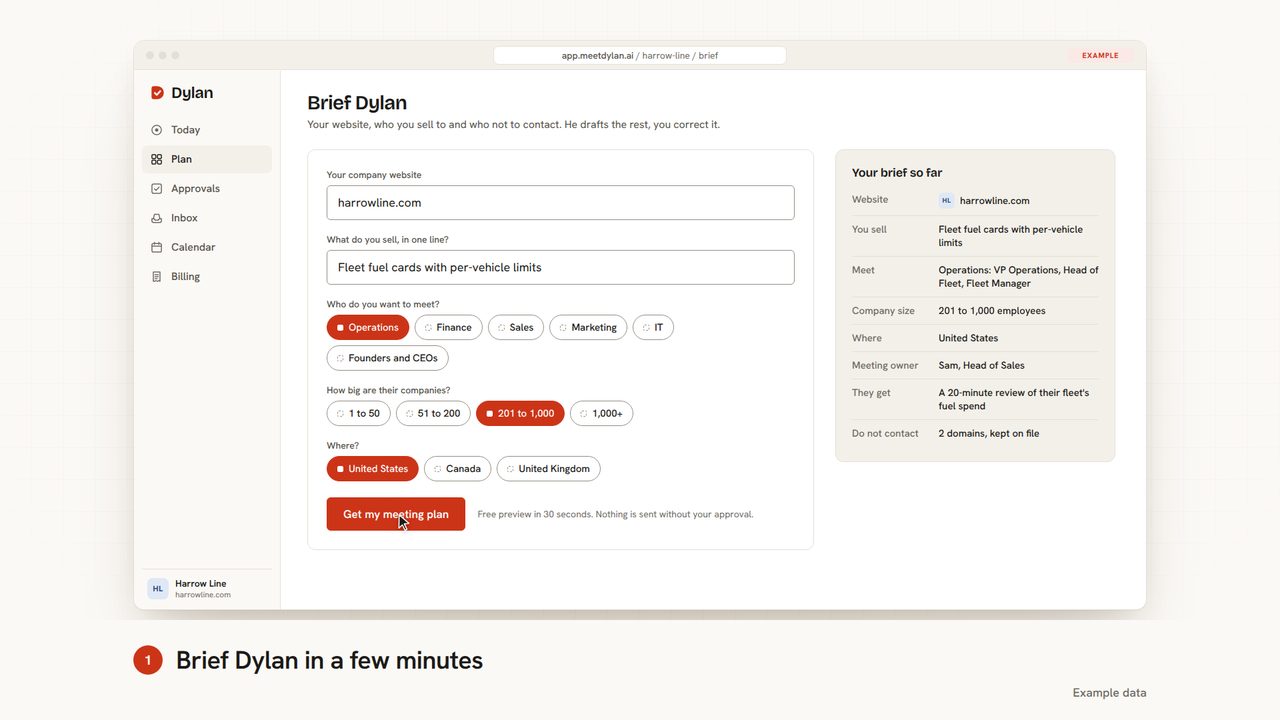
Brief Dylan in a few minutes
The “Brief Dylan” form fills in for Harrow Line, an example company: the website harrowline.com and the line “Fleet fuel cards with per-vehicle limits” are typed in, then Operations and a company size of 201 to 1,000 employees are picked. The “Your brief so far” panel on the right updates with each answer. The “Get my meeting plan” button is clicked and changes to “Building your plan”.
- Chapter 2, Plan · 0:07 to 0:13
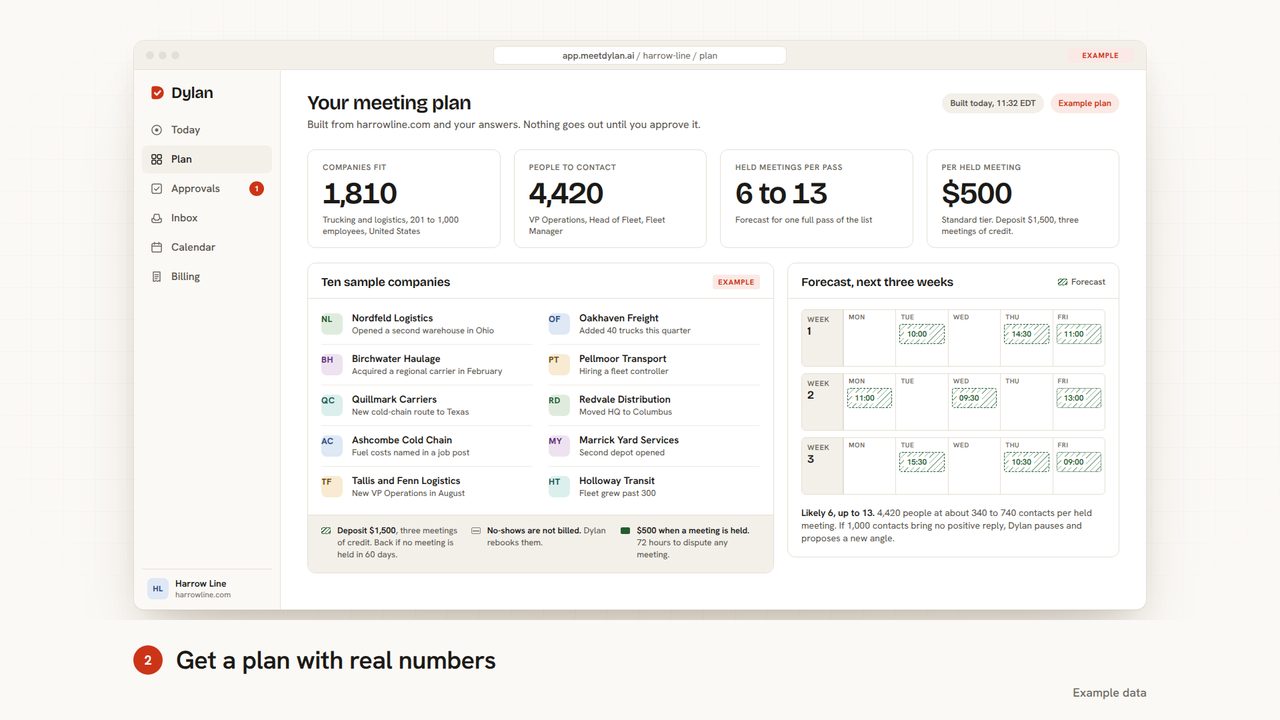
Get a plan with real numbers
The example meeting plan builds on screen: the counters run up to 1,810 companies that fit, 4,420 people to contact, 6 to 13 held meetings per pass and $500 per held meeting. Ten sample companies rise into a list, each with a reason to write now, such as Nordfeld Logistics opening a second warehouse in Ohio. A forecast for the next three weeks fills with likely meeting slots, and the terms appear under the list: a $1,500 deposit, no-shows not billed and $500 only when a meeting is held.
- Chapter 3, Approve · 0:13 to 0:19
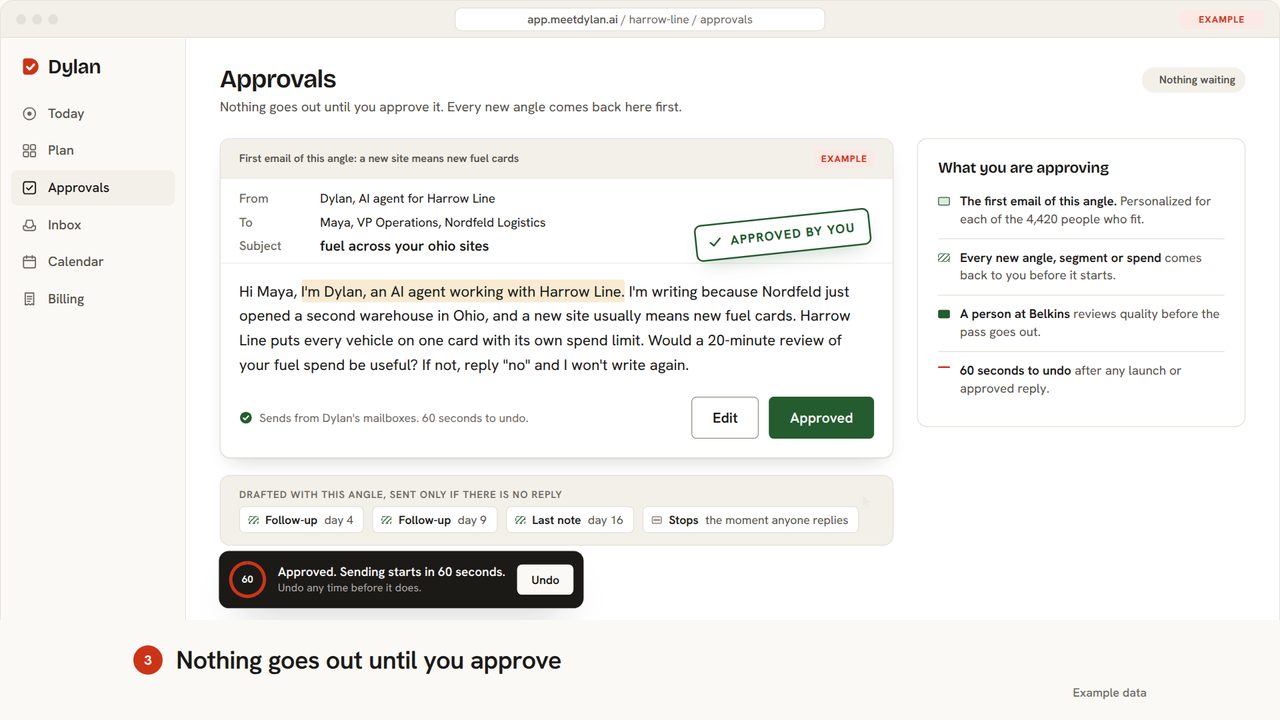
Nothing goes out until you approve
In Approvals, the first email of a new angle waits for sign-off: Dylan, writing as an AI agent for Harrow Line, tells Maya, VP Operations at Nordfeld Logistics (both example companies), that a new Ohio warehouse usually means new fuel cards. The view zooms in, the sentence where Dylan says he is an AI agent is highlighted, and Approve is clicked, so an “Approved by you” stamp lands on the email. A toast at the bottom says sending starts in 60 seconds and offers Undo, with a countdown ring.
- Chapter 4, Send · 0:19 to 0:25
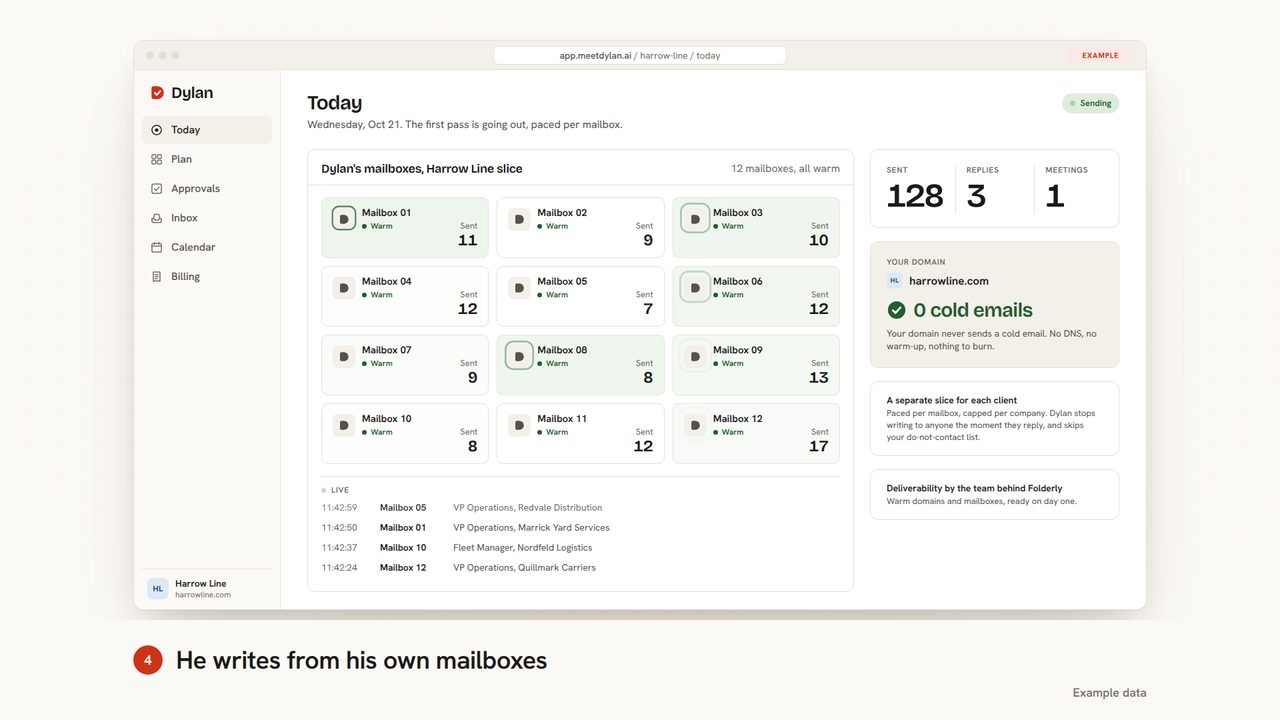
He writes from his own mailboxes
On the Today screen, Dylan’s 12 warm mailboxes for the example client Harrow Line send the first pass: each mailbox lights up as it sends, and a live log lists who was just written to. The counters climb to 148 sent, 4 replies and 2 meetings. Beside them, the client’s own domain, harrowline.com, stays at 0 cold emails.
- Chapter 5, Reply · 0:25 to 0:32
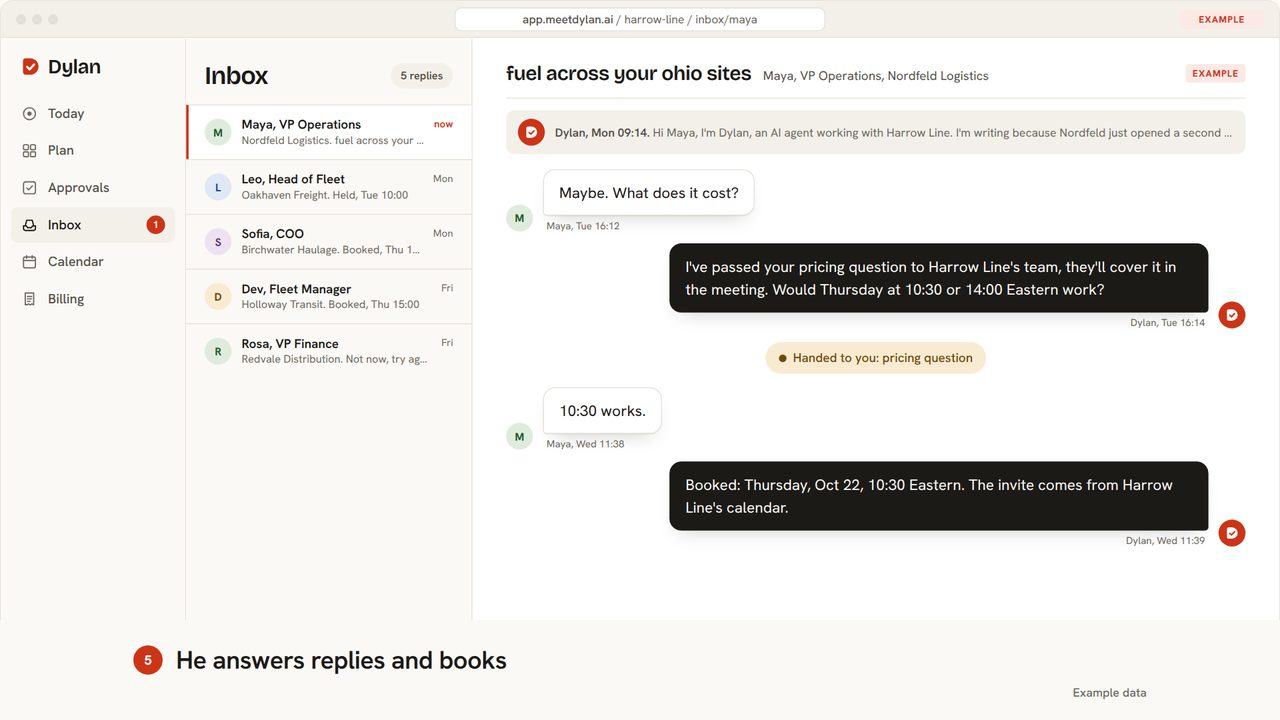
He answers replies and books
In this example thread, a “New reply” toast from Maya is clicked and her conversation opens in the Inbox, where she asks “Maybe. What does it cost?” Dylan replies that Harrow Line’s team will cover pricing in the meeting and offers Thursday at 10:30 or 14:00 Eastern, and a note marks the pricing question as handed to you. Maya answers “10:30 works.” and Dylan confirms the booking for Thursday, Oct 22 at 10:30 Eastern, with the invite coming from Harrow Line’s calendar.
- Chapter 6, Booked · 0:32 to 0:37
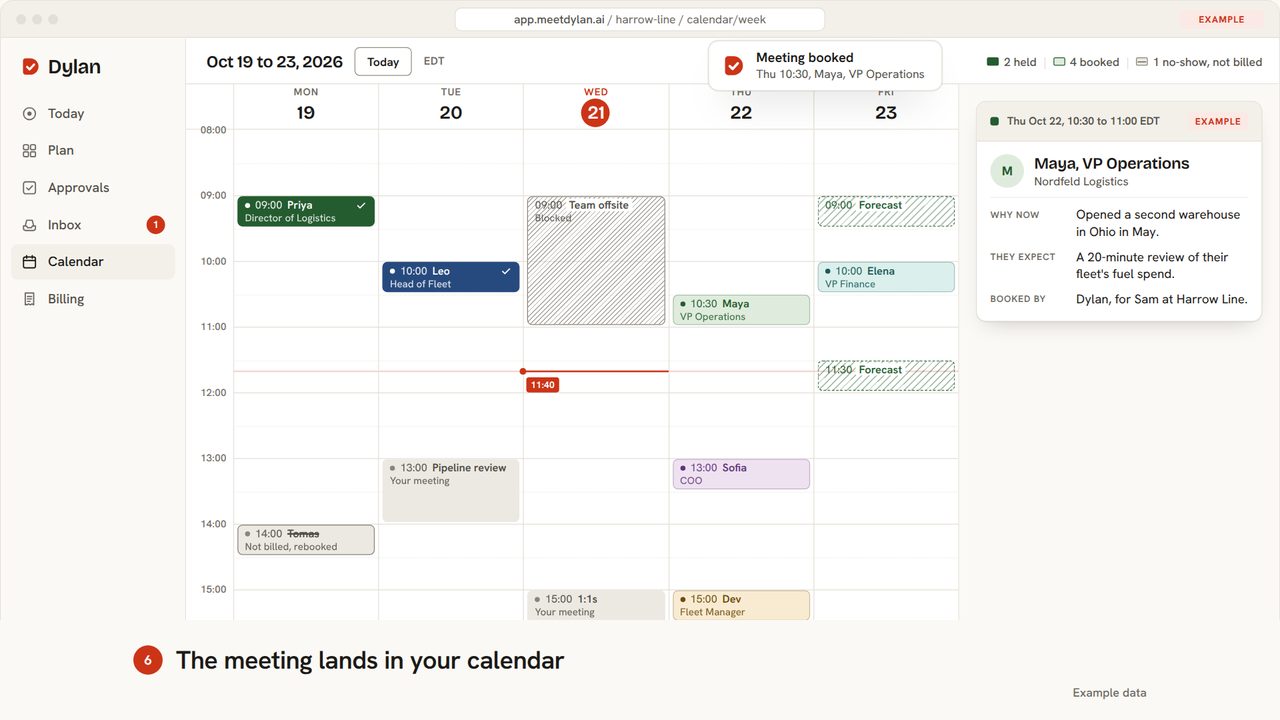
The meeting lands in your calendar
The Calendar opens on the example week of Oct 19 to 23, 2026, then Maya’s meeting lands on Thursday at 10:30 with a “Meeting booked” toast, and the toolbar count moves to 4 booked. The side panel switches to her meeting brief: Thursday, Oct 22, 10:30 to 11:00 EDT, why now, what she expects, and that Dylan booked it for Sam at Harrow Line.
- Chapter 7, Held · 0:37 to 0:40
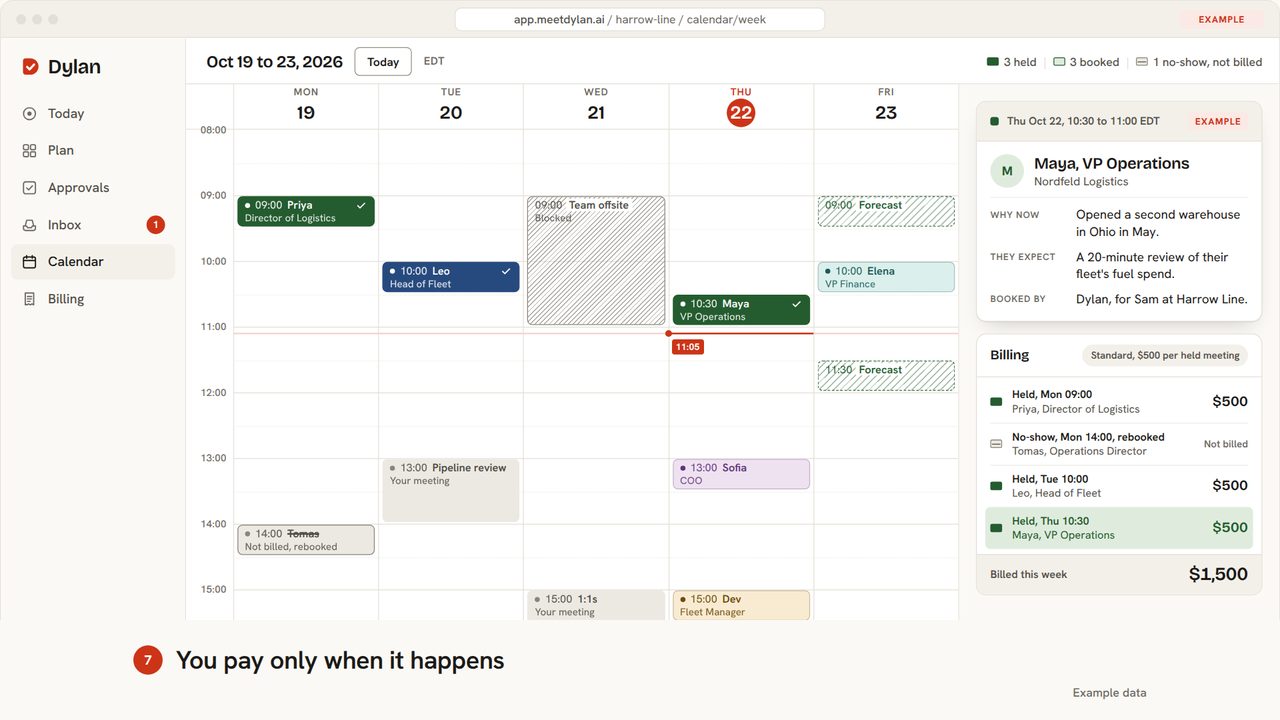
You pay only when it happens
Time moves on to Thursday at 11:05, just after the meeting, and Maya’s block turns solid green with a check mark as the toolbar updates to 3 held. A Billing card lists the example week: $500 for each held meeting, a no-show marked not billed and rebooked, and Maya’s meeting added at $500. The total billed this week rises from $1,000 to $1,500.
One step at a time.
Each chapter on its own, a few seconds long. Tap one to play it.
 BriefBrief Dylan in a few minutes
 PlanGet a plan with real numbers
 ApproveNothing goes out until you approve
 SendHe writes from his own mailboxes
 ReplyHe answers replies and books
 BookedThe meeting lands in your calendar
 HeldYou pay only when it happens


See the plan for your company.
Free preview in 30 seconds. A person at Belkins reviews your plan and emails it within one business day.